70 Lumen Trionic LED Rear Lights (pair)

This manual both shows how you attach the rear light and the light on a Walker (left column below) and also how you attach them on a Trionic Veloped (right column below).

In the left-hand photo, A shows the 10-degree angled strap for attaching the lights on a Trionic Walker. B shows the 0-degree angled strap for attaching the lights on a Trionic Veloped.

B shows the 0-degree angled strap for attaching the lights on a Veloped.

70 Lumen Trionic LED Rear Lights

Attaching the LED Lights

Instructions for a Walker

Of the two rubber straps included, choose the one with a 10-degree angled light attachment section.
A1. Of the two rubber straps included, choose the one with a 10-degree angled light attachment section.
Push the light into the slot of the strap until it snaps in place.
A2. Push the light into the slot of the strap until it snaps in place.
Attach the light to the Walker, either on the semi-vertical frame tube just below the height adjustment quick-release lever, or on the black semi-vertical grip tube. Pull the strap tight and fix it with the plastic hook.
A3. Attach the light to the Walker, either on the semi-vertical frame tube just below the height adjustment quick-release lever, or on the black semi-vertical grip tube. Pull the strap tight and fix it with the plastic hook.
Pull the strap tight and fix it with the plastic hook.
A4. Pull the strap tight and fix it with the plastic hook.

Instructions for a Trionic Veloped

Of the two rubber straps included, choose the one with a 0-degree angled light attachment section.
B1. Of the two rubber straps included, choose the one with a 0-degree angled light attachment section.
Push the light into the slaot of the strap until it snaps in place.
B2. Push the light into the slaot of the strap until it snaps in place.
Attach the lights to the Trionic Veloped, preferably on the two rear vertical frame tubes, below the height-adjustment quick-release levers. Pull the strap tight and fix it with the plastic hook.
B3. Attach the lights to the Trionic Veloped, preferably on the two rear vertical frame tubes, below the height-adjustment quick-release levers. Pull the strap tight and fix it with the plastic hook.
Pull the strap tight and fix it with the plastic hook.
B4. Pull the strap tight and fix it with the plastic hook.

Instructions for Use

The package contains

Caution

It is normal for the battery to reach a high temperature (up to 104°F / 40°C) during charging due to chemical reactions within the battery. The battery may also become warm if it is not fully drained before charging.

Several factors can affect the battery's lifespan, including the type of cell, usage strain, maintenance routine, temperature, and the number of charge cycles. Generally, a higher battery capacity results in a longer operation time.

The battery capacity may decrease to approximately 80% of its original capacity after 300–500 charge/discharge cycles. With proper care, the battery can have a lifespan of up to 3 years.

Water resistant is for rain water only. Do not submerge the bat- tery or the whole light into water when cleaning. Clean the light with a soft damp cloth when needed."

Battery Performance

Battery performance is significantly affected by temperature variations:

•Low Temperature: At 0°C, capacity decreases by 5–10%, reducing operation time by 50%. At -20°C, capacity drops by 30%, potentially shortening operation time by 70%. Performance returns to normal when the temperature rises to 20°C.

•Self-Discharge Rate: At room temperature, the battery loses about 1% of its capacity per day. When stored at 40°C, the self-discharge rate increases, leading to a loss of approximately 5% of capacity per day.

To maintain optimal battery performance, avoid exposing it to extreme temperatures and store it in a cool, dry place.

If you do not use the battery for a long time be sure to recharge the battery every 3 months.

How to charge the battery

  1. Find the charging place at the bottom of the light.
  2. Lift the rubber cover to access the charging port.
  3. Plug the USB-cable into your USB-charger.
  4. Plug the charging cable into the light's charging port.
  5. The indicator shows red during charging.

The charging indicator turns green when fully charged.

Attention: Use the original supplied USB-cable to charge the battery. Unplug the charging cable once the battery is fully charged.
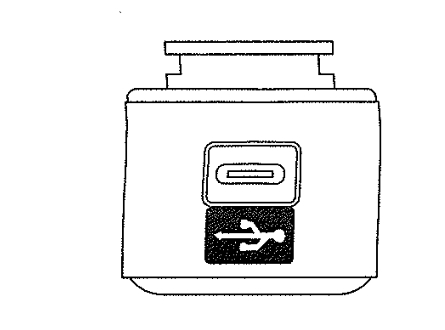
How to charge the battery

How to operate the light

Press and hold the switch for 2 seconds to turn the light on or off. Click once to cycle through modes.

Safe Mode

When the battery is low, the light will automatically switch to a 5-lumen steady mode, providing an additional 30 minutes of operation.

Product Reviews    

  • Great Walker…

    Very stable 12-inch walker.
    Folding it, especially in the tram, is not easy.
    I go to a day centre in Vienna and do a lot of advertising.…

  • My Veloped has improved my quality of life unbelievably!…

    Probably a little too early for a full review yet as I have only had my 14” medium nearly two weeks but already it has accompanied me on a two day mountain First Aid Course at Plas-y-Brenin in North Wales where it behaved impeccably clambering over b…

  • Wow, exactly what was expected.…

    Excellent service, communication skills of Stefan are brilliant.

    Couldn't ask for or expect better delivery, quality, packaging etc, etc.

    A five-star piece of equipment and five stars for communication and service.

    Thank you for giving our s…

  • Walker 12-inch wheels.…

    I have had my Walker for about 6 weeks. I am delighted with it. It is very well made, sturdy, folds well for putting into the car for transport and is not too heavy. The service I have received is excellent. I had major spinal surgery for cancer and …

  • Just plain good!…

    Just plain good!…

  • If You Walk in the Dark – You Need These…

    I usually walk along the road in the dark evenings, so what better idea than to buy these led front lights?…

  • An investment in health and independence…

    After five years of loss of mobility due to neurological problems I took the plunge and purchased a Trionic Sport Veloped with a comfort seat. My previous experience had been with a wheelchair, crutches and a lightweight rollator and I had considered…

  • Major benefits over rough ground…

    My Veloped Sport has had major benefits above & beyond my old standard rollator. Walking out in woods with the dogs no need to steer around rough areas, just push & go.
    Walking over my horse's field is easier, doesn't get stuck in rough ground & Chr…

  • Both Trionic buys have been absolute godsends.…

    Just a few words of praise for my Trionic Walker.

    I fell Friday week ago and broke my hip. I am 67 and have Post Polio Syndrome. I own both Walker and Veloped but following surgery and half hip replacement my Walker has really come into its own. M…

Subscribe to our newsletter!